EverApply Phase 1: Automating the Job Hunt with AI
My little brother is job hunting right now. Fresh out of school, sending applications into the void, not hearing back from half of them, and spending more time on job boards than anyone should have to.
I watched him one evening scrolling through Indeed, opening tabs, closing tabs, copy-pasting the same resume into form after form, and it struck me how much of that process is just noise. Most of the roles weren’t even relevant. Too senior, requires a clearance, technically “remote” but actually hybrid in a city he’s not in. He was doing all the filtering manually, which meant he was spending most of his energy on jobs that were never going to work out anyway.
So I built him EverApply.
The idea is simple: scrape fresh job postings every morning, score each one against his resume using an LLM, and only surface the matches that are actually worth looking at. No job board accounts, no browser tabs, no manual filtering. Just a ranked list of relevant roles waiting for him when he wakes up.
How It Works
The pipeline has three stages: fetch, score, and surface.
Fetch runs every weekday at 7am and 10am. A scheduler fires off a scrape of Indeed via Apify and pulls up to 50 jobs posted in the last 24 hours. The search keywords aren’t hardcoded either. They’re built from the job titles in his parsed resume, so the query is actually tailored to what he does. Jobs get stored in Postgres with their description, location, remote type, and an expiry timestamp calculated from how old the posting actually is, not just when it was fetched.
Score passes each new job to DeepSeek along with his resume summary and skills list. The model returns a score from 0 to 100 and a one-sentence reason. I’m not doing vector embeddings or cosine similarity. The LLM handles synonym reasoning natively. It knows that “Frontend Engineer” and “React Developer” are the same thing. A job only becomes a match if it clears a minimum score threshold.
Surface is where matches land in a job_matches table with a status of new. He can flip them to saved, applied, or dismissed. The API returns them sorted by score, filtered by status. That’s what the frontend will eventually consume.
The Filtering Layer
Raw job data is noisy. Before anything gets scored, a few filters run.
Remote type. If his preference is remote, onsite jobs get skipped before DeepSeek ever sees them. No point paying for a score on a job he would never take.
Clearance. I added a preference flag called exclude_clearance. If it’s on, any job description containing words like “TS/SCI”, “security clearance”, or “top secret” gets skipped entirely. This came up because the first batch of matches included a defense contractor role flagged as a strong match based on his skills. Technically accurate, not actually relevant to him.
Deduplication. Jobs are matched by source_url so the same posting never gets scored twice. Matches are deduplicated by user_id + job_id pair, so running the score pipeline multiple times is safe and cheap.
These filters run before the DeepSeek call, which matters. Every skipped job is a token I’m not spending.
The Part That Took the Most Iteration
Getting the scoring right was harder than I expected.
The first version passed only a one-sentence resume summary to the model. The scores came back clustered around 85 for everything, not because the jobs were all good fits, but because the model didn’t have enough context to differentiate. Once I added the full skills list to the prompt, the distribution got more realistic and the reasons got more specific.
The system prompt also needed calibration anchors. Without them, DeepSeek would give a 70 to a partial match and an 85 to a strong one, but the gap felt arbitrary. Spelling out what a 90, 80, 70, and 50 actually mean in terms of required skills coverage and seniority alignment tightened the scoring considerably.
I also learned the hard way that the Apify scraper returns job descriptions in a descriptionText field, not description. All 50 jobs in my first test run had empty descriptions, so every match scored 0. The fix was a one-liner, but I had already triggered an Apify run I couldn’t get back.
Tech Decisions Worth Noting
DeepSeek over embeddings. No pgvector, no numpy, no semantic similarity math. One API call per job, structured JSON output with response_format: json_object, done. The model reasons about synonyms natively. This is simpler to maintain and the per-call cost is low enough that it’s not a concern at this scale.
JSONB for preferences. User preferences live in a JSONB column, not a normalized table. This means adding a new preference field like exclude_clearance requires no migration, no ALTER TABLE, just updating the Pydantic schema. For a feature set that’s still evolving, this has been the right call.
APScheduler over Celery. No Redis, no separate worker process, no deployment complexity. The scheduler runs inside the FastAPI process and starts with the app. At this scale it’s plenty. If I ever need distributed workers or job retries, that’s a Celery problem for a future version.
One resume per user. When you upload a new resume, the old one gets deleted from Cloudflare R2 before the new one goes up. Simple constraint that keeps storage clean and avoids confusion about which resume is being used for scoring.
Honest Limitations
The remote type data from Indeed is inconsistent. Some jobs come back with isRemote: true, others have it in an attributes array, and some have nothing at all. The filter works when the data is there, but a portion of jobs still slip through with a null remote type. This is a scraper data quality problem, not something I can fully fix on my end.
There’s no pagination on the matches endpoint yet. Fine for now since the dataset is small. It’ll matter more once weeks of daily fetches accumulate.
The clearance filter is keyword-based. A job that requires clearance but phrases it differently would still get scored. It catches the common cases, but it’s not airtight.
Where It Stands
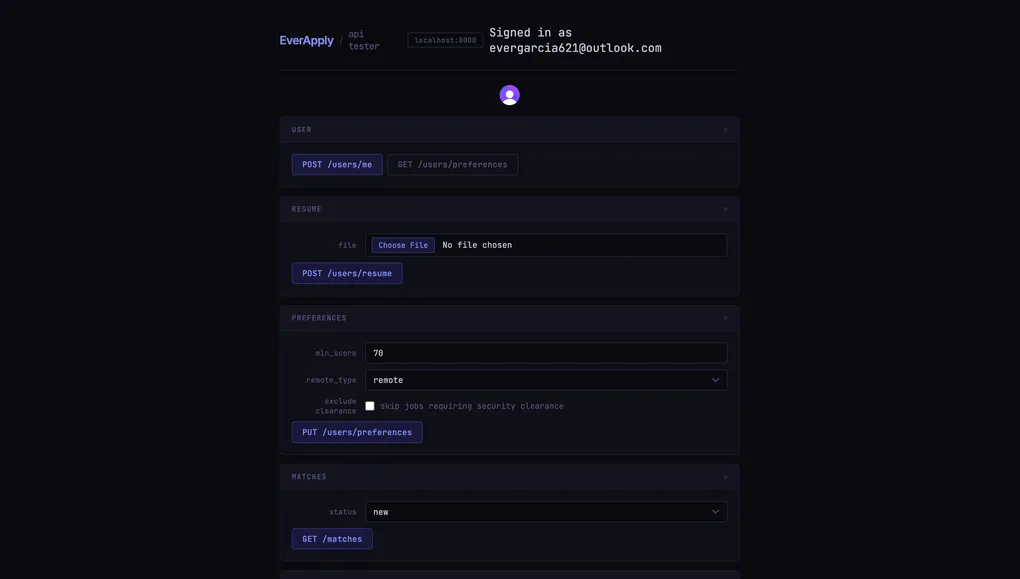
Phase 1 is complete. The pipeline runs, the scheduler is live, and every core endpoint has been tested end-to-end. There’s no frontend yet. Right now everything is being validated against a plain HTML test page.
Phase 2 is the actual UI. A dashboard where he can swipe through matches, see the score and reason, open the original posting, and mark things as saved or dismissed. That’s what I’m building next.
Honestly, building this for someone specific made it better. Every design decision had a real person behind it, not a hypothetical user, just my brother sitting on his couch trying to find a job. That’s a pretty good north star.